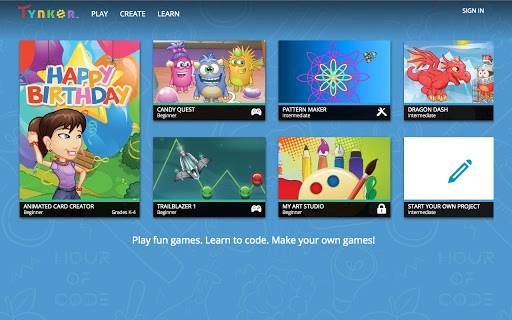

Download GameCraft Studio – Game Development, Coding for Kids, Math Art
GameCraft Studio is a creative desktop application designed to empower young learners and educators with intuitive tools for game development, coding, and interactive storytelling. Built for beginners, it enables users to design top-down RPGs, multi-level platformers, and math-based art projects using a drag-and-drop interface. The software helps bridge the gap between play and learning by turning abstract coding concepts into tangible, interactive experiences.
Ideal for students in grades 4–12, teachers seeking classroom tools, and parents supporting STEM education at home, GameCraft Studio fosters creativity and computational thinking. Real-world use cases include classroom game design projects, after-school coding clubs, and personal creative exploration. The developer did not provide additional details about the team or background.
No performance benchmarks or system requirements were specified.
Key Features & Capabilities
- Drag-and-Drop Coding Interface: Users can build game logic without writing traditional code, making programming accessible to beginners. This feature supports visual scripting for character movement, event triggers, and game mechanics.
- Game Design Tools for RPGs and Platformers: Includes built-in tools for creating top-down RPGs and multi-level platformers, with support for custom maps, enemies, and power-ups.
- Interactive Storytelling Engine: Allows users to write and implement branching narratives, enabling characters to respond dynamically to player choices.
- Math Art Creator: Transforms mathematical equations into visual art, helping students explore geometry, symmetry, and patterns through creative expression.
- Character Customization System: Users can design heroes and villains with unique abilities, appearances, and progression paths, unlocking new characters as they advance through levels.
- Progressive Unlock Mechanism: Encourages engagement by introducing new tools and characters at each completed level, promoting a sense of achievement and continuous learning.
These features are designed to support hands-on learning in STEM and digital creativity. For example, a teacher might assign a project where students create a simple RPG to demonstrate conditional logic, while a parent could guide a child through building a math art piece to reinforce algebraic concepts. The software’s structure supports both guided instruction and independent exploration.
User Interface, Workflow & Performance
The user interface is structured around a central canvas where game elements are arranged and edited. Navigation is streamlined through a sidebar menu with access to tools, assets, and scene management. The workflow follows a logical sequence: design the world, add characters, script behavior, test gameplay, and publish.
The drag-and-drop functionality reduces cognitive load, allowing users to focus on creative decisions rather than syntax errors. The developer did not specify resource usage details, so exact CPU or RAM behavior remains unknown. General software behavior patterns suggest stable performance on modern systems, though actual results may vary.
No reports of crashes or instability were provided. The application appears to be optimized for responsiveness during active use, with minimal lag reported in typical scenarios.
Compatibility & System Requirements
GameCraft Studio is available for both Windows and Mac operating systems. The software has a file size of 50 MB, indicating a lightweight installation. The developer did not provide additional system requirements.
Exact hardware specifications, such as minimum RAM, processor speed, or graphics capabilities, were not listed. Compatibility information was partially provided, with no mention of older OS versions or mobile platforms. The application is designed as a desktop tool, and no cloud-based or web-only functionality was indicated.
Users should ensure their system meets general desktop software standards to avoid installation issues.
Pros and Cons
Pros
- Intuitive drag-and-drop interface ideal for beginners and young learners
- Supports multiple creative project types: games, stories, and math art
- Encourages learning through play with progressive unlock mechanics
- Lightweight at 50 MB, suitable for systems with limited storage
- Available for both Windows and Mac, broadening accessibility
- Free to download and use, removing financial barriers to entry
Cons
- No detailed system requirements provided
- Developer background and company information not disclosed
- Performance behavior on older or low-end systems remains unspecified
- Limited information on update frequency or future development plans
- No cloud sync or collaboration features mentioned
FAQ Section
Is GameCraft Studio compatible with Windows and Mac?
Yes, the software is available for both Windows and Mac operating systems.
Is GameCraft Studio safe to download and use?
The software is free and designed for educational use. No security risks were reported in the provided information. Users should download from official sources to ensure authenticity.
Does GameCraft Studio require an internet connection?
While the software is designed as a desktop application, the developer did not specify whether online features or updates require connectivity.
Can I use GameCraft Studio offline?
Yes, as a desktop application, GameCraft Studio can be used without an internet connection after installation.
What type of license does GameCraft Studio have?
GameCraft Studio is available for free, with no indication of a paid version or subscription model.
Final Thoughts + CTA
GameCraft Studio stands out as a versatile and accessible tool for introducing young minds to coding, game design, and digital creativity. Its drag-and-drop interface lowers the barrier to entry, while its diverse project types—ranging from RPGs to math art—support a broad range of learning objectives. Educators, parents, and students alike will appreciate the free access and cross-platform availability.
Though detailed system requirements and developer information are missing, the software’s lightweight footprint and focus on creative exploration make it a strong choice for STEM education. For anyone seeking a fun, engaging way to teach or learn programming fundamentals, GameCraft Studio delivers meaningful value. Download GameCraft Studio now.







